FigureLabs Alternative Built for Scientific Figure Revisions
FigureLabs alternative for editable scientific figures. Compare FigEditor on SVG editing, revision costs, pricing, exports, and research workflows.
On this page
- What We Looked for in a FigureLabs Alternative
- FigureLabs vs FigEditor: which scientific figure tool fits your workflow?
- Why researchers still look for a FigureLabs alternative
- 1. "Vector" does not always mean easy to revise
- 2. Credits get consumed fast between generation and export
- 3. Scientific work rarely ends after the first prompt
- How FigEditor keeps scientific figures editable
- Create visual scientific illustrations from text, sketches, and references
- Keep method diagrams editable through reviewer revisions
- Revise experimental pipelines and model architectures with version history
- Correct one region without regenerating the whole figure
- How to test a FigureLabs alternative with one research figure
- Step 1: Import a prompt, sketch, or existing scientific figure
- Step 2: Generate a draft and revise one specific element
- Step 3: Export editable SVG and inspect the structure
- Where the Editable Workflow Matters Most
- FigureLabs pricing vs FigEditor credits: what does one scientific figure cost?
- Which scientific figure tool should you choose?
- Choose FigureLabs if…
- Choose FigEditor if…
- FigureLabs alternative FAQ
- What is the best FigureLabs alternative for editable scientific figures?
- How much does FigureLabs cost per scientific figure?
- Can FigureLabs export editable SVG files?
- Is FigEditor better than FigureLabs?
- Can FigEditor edit an existing scientific figure?
- Does FigureLabs train on my research data?
- Which FigureLabs alternative can turn a paper into a scientific poster?
- How do I move from FigureLabs to FigEditor?
- Verdict: choose the workflow that survives revision
If you are searching for a FigureLabs alternative, it is usually not because AI cannot produce a first draft. It is because you have already generated figures with AI and got stuck on the "edit" step: a coauthor asks you to change one label, reposition one arrow, or add a missing experimental branch, and you find yourself regenerating the whole figure or burning through credits on every revision.
Bring the rest of your research to life
Create scientific diagrams, graphical abstracts, and research visuals with FigEditor’s AI Scientific Figure Generator.
That is the problem FigEditor is built to solve. The short answer: FigureLabs is a polished, all-in-one workspace, a strong fit if you need a dedicated plot tool and editable PPTX. FigEditor is the better fit when your figures go through repeated revisions and you need to edit labels, nodes, and SVG structure directly.
Key takeaways
- Choose FigureLabs for its cohesive workspace, dedicated Plot mode, editable PPTX, and higher-resolution plans.
- Choose FigEditor when direct SVG structure, local revisions, version history, and paper-to-poster continuity matter more.
- Compare the cost of a completed revision, not the sticker price or raw credit balance.
What We Looked for in a FigureLabs Alternative
We used six criteria that reflect the work researchers do after generation:
- Revision precision: can one label, arrow, object, or region change without regenerating the whole figure?
- Editable structure: do text, nodes, connectors, and graphical elements remain understandable after export?
- Input flexibility: can the workflow start from text, a sketch, a reference image, or paper content?
- Project continuity: do prompts, source material, versions, and outputs remain connected?
- Output fit: are SVG, PPTX, plots, posters, and resolution options available for the intended deliverable?
- Total revision cost: what do generation, local edits, vector export, and failed tasks cost together?
Testing note: We reviewed the authenticated FigureLabs editor, public pricing, terms, privacy policy, a small Reddit discussion, and a Labcritics review on July 31, 2026. We also reviewed FigEditor's implementation and anonymized research-workflow survey data. We did not treat a single Reddit comment as representative of every export.
FigureLabs vs FigEditor: which scientific figure tool fits your workflow?
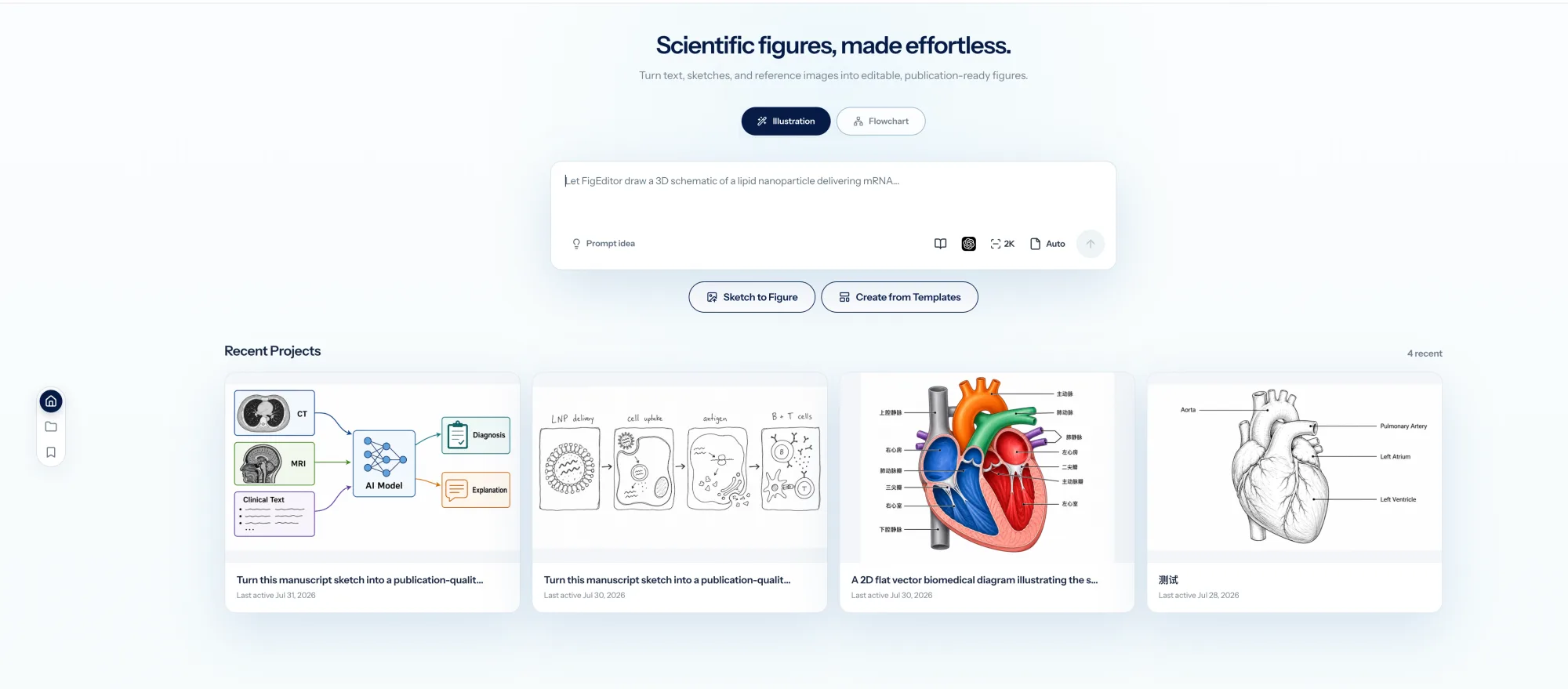
The FigEditor Studio workspace keeps figure creation, model controls, and recent projects together on one screen.
| FigureLabs | FigEditor | |
|---|---|---|
| Best for | A polished all-in-one AI figure workspace | Authors whose figures need multiple precise revision rounds |
| Input | Text, sketches, reference images, files | Text, sketches, reference images, files, paper excerpts |
| Editable SVG | Vector Canvas + paid vector export | AutoFigure / Flowchart with direct SVG editing |
| Local edits | Region redraw, text edit, recolor, canvas editing | Selected-area AI editing, labels, nodes, connectors, SVG source |
| Flowcharts | Dedicated Flowchart mode | Flowchart Agent with editable canvas and version history |
| Plots | Dedicated Plot mode | Plot generation |
| Editable PPTX | Yes | Not a native export today |
| Poster workflow | Not central to our test | Scientific poster maker from PDF |
| Project continuity | Projects, chat history, Library | Projects, conversations, creations, versions, share links |
| Max advertised resolution | Up to 8K on higher plans | Up to 4K in the current Studio catalog |
| Failed-generation credits | Check the current policy | Automatically refunded |
This comparison is based on the products and public pricing visible on July 31, 2026. Both products keep evolving, so verify the current plan page before purchasing.
Why researchers still look for a FigureLabs alternative
The most useful public discussion is not a big review platform. It is a small Reddit thread among laboratory researchers and a short Labcritics tool review. The sample is limited, but several recurring themes match the practical problems of scientific-figure work.
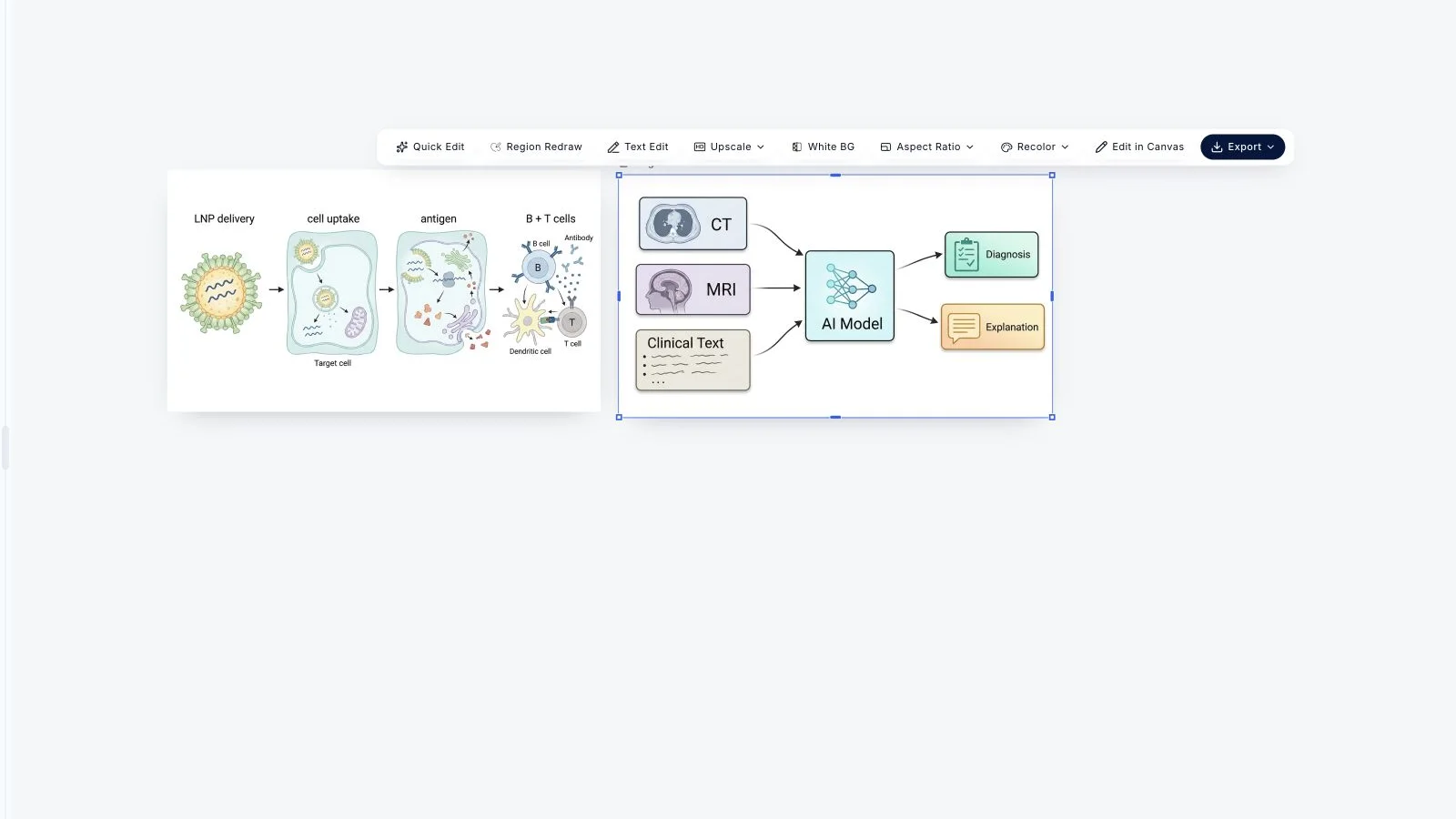
FigureLabs' canvas keeps generated results alongside Quick Edit, Region Redraw, Text Edit, recolor, canvas editing, and export. Its editing coverage is genuinely broad.
1. "Vector" does not always mean easy to revise
One paying user described the exported result as a bitmap converted into groups of spline curves rather than a clean, semantically organized SVG. That does not mean every FigureLabs export has this problem, but it reveals an important distinction:
- Vectorized pixels can scale cleanly but still be frustrating to edit.
- Structured scientific graphics keep labels, nodes, connectors, and graphical elements understandable.
When a coauthor asks you to rename one variable, change the direction of one arrow, or add a missing experimental branch, this distinction matters a lot.
2. Credits get consumed fast between generation and export
As the section above shows, FigureLabs charges separately for generation and vector export, and a full revision usually needs both. Some users felt the base-tier allowance was not enough to support multiple rounds on a single figure. FigEditor integrates generation and editing into one editable flow, with lower per-operation costs and automatic refunds on failure.
3. Scientific work rarely ends after the first prompt
In an anonymized survey from an earlier scientific-illustration product, 13 of 35 trial users said their last result was almost usable but still needed editing. The most common required changes were style (14), scientific accuracy (11), layout (9), unwanted text (9), labels (9), arrows (8), and colors (8).
Among 12 paying users, the two most requested improvements were better SVG editing and AI region editing. Their instructions often had the same shape: change this one label, increase this one text size, and preserve everything else.
How FigEditor keeps scientific figures editable
FigEditor does not push every result through the same flattened-image pipeline. It offers different paths for different scientific tasks.
Create visual scientific illustrations from text, sketches, and references
Supports descriptions, sketches, reference images, multiple image models, styles, colors, aspect ratios, and resolutions. The conversation and source material stay with the project, so later revisions keep their context.
Keep method diagrams editable through reviewer revisions
For method diagrams, architecture diagrams, and schematics that get revised repeatedly. You can work with labels, graphical objects, nodes, connectors, and the SVG source directly, instead of treating the entire figure as one indivisible picture.
Revise experimental pipelines and model architectures with version history
It preserves analysis, composition, canvas state, and versions. That helps with experimental pipelines, model architectures, clinical workflows, and study protocols that keep changing during review.
Correct one region without regenerating the whole figure
When the overall composition already works, you should not have to regenerate everything to fix one region. Selected-area editing contains the change and reduces unintended drift elsewhere.
How to test a FigureLabs alternative with one research figure
Use the same difficult figure, source material, and requested revision in both products. This reveals editability, revision time, and credit use more clearly than comparing gallery examples. The steps below show the FigEditor side with real product screenshots.
Step 1: Import a prompt, sketch, or existing scientific figure
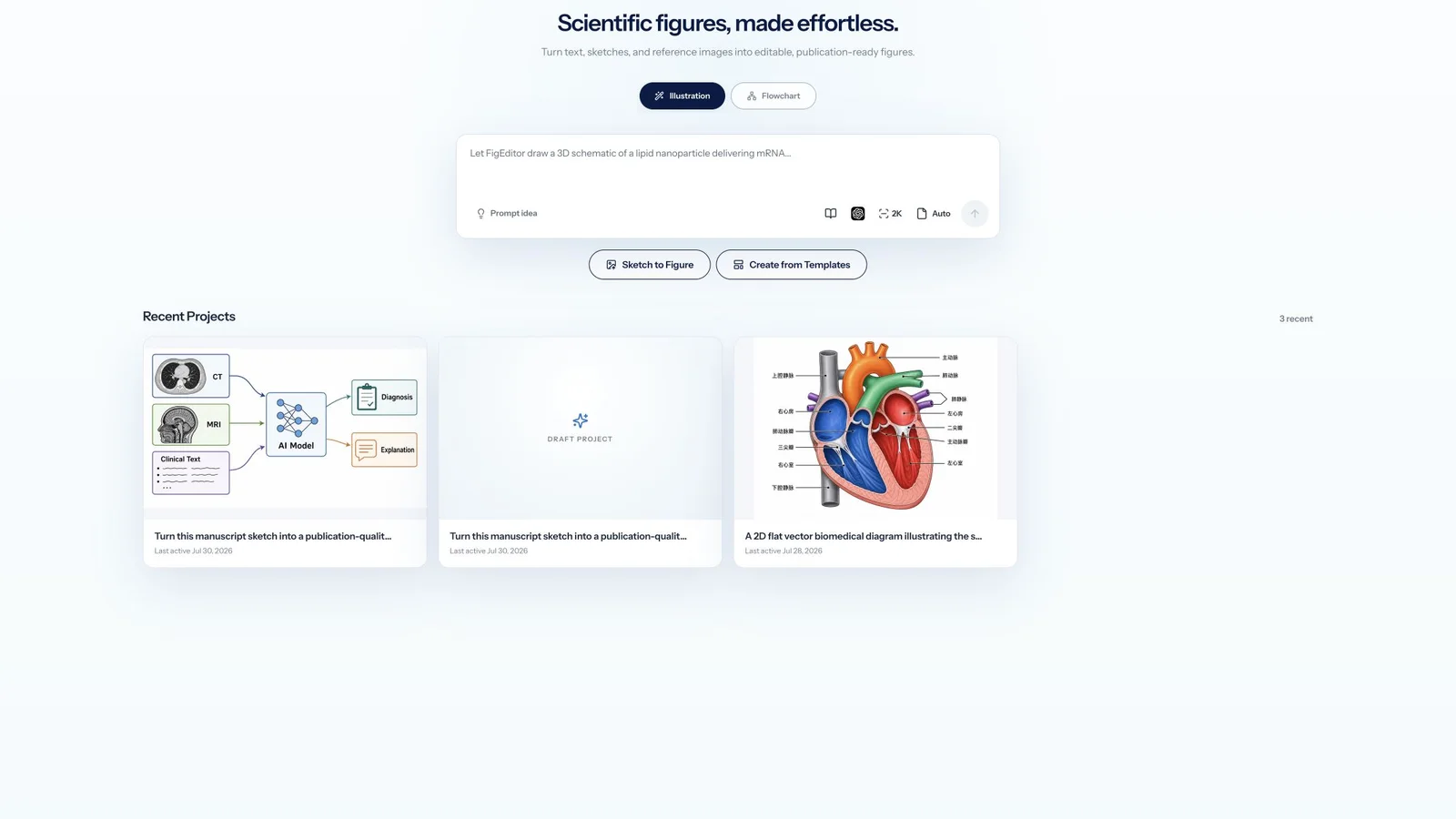
Bring a methods paragraph, rough sketch, reference image, or figure that already needs revision. Keep the scientific source nearby so every label, arrow, and relationship can be checked.
Step 2: Generate a draft and revise one specific element
Create the first draft, then request a realistic change such as renaming a label, moving one connector, or replacing one region while preserving the rest of the composition.
Step 3: Export editable SVG and inspect the structure
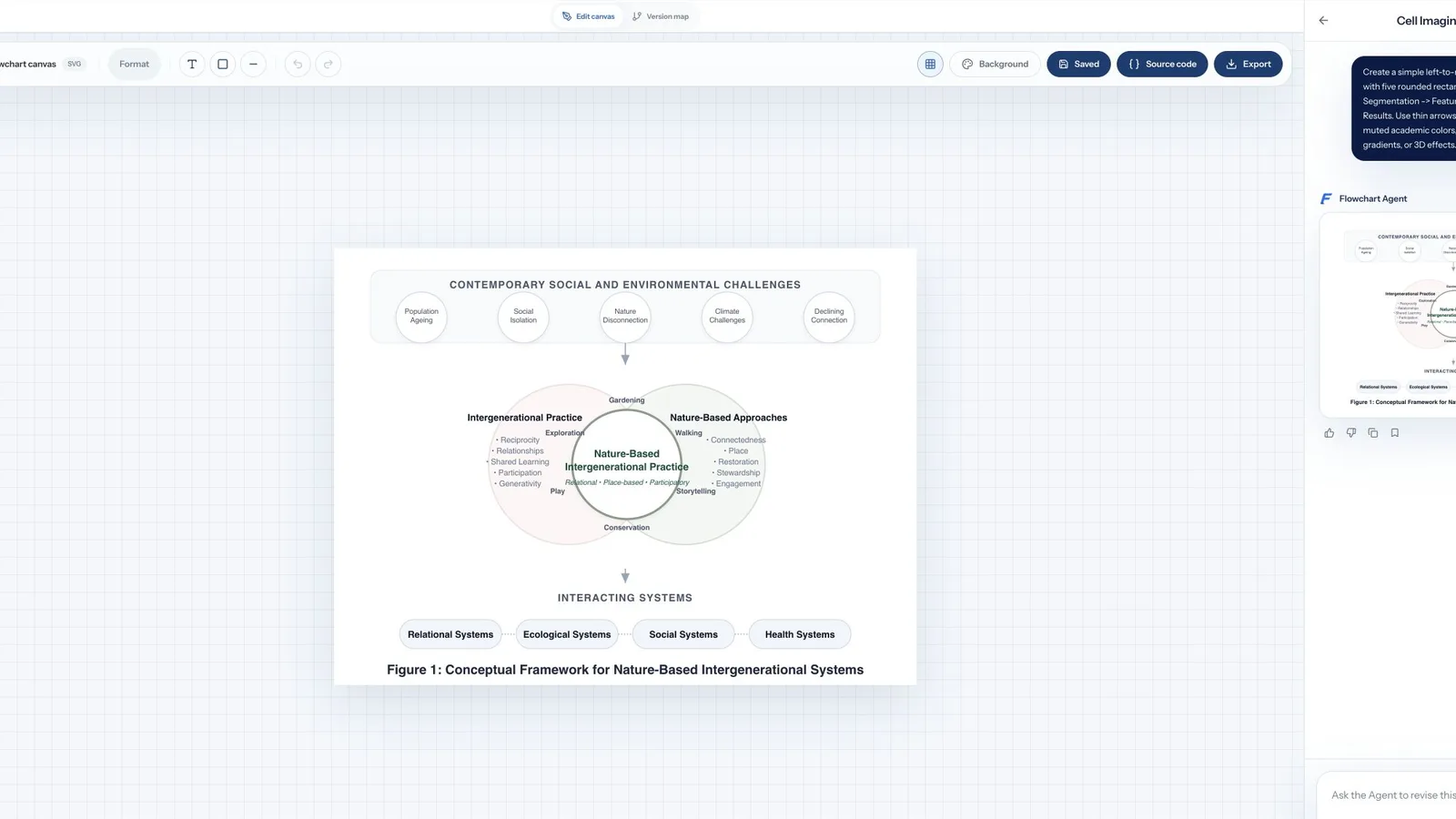
Open the SVG in the built-in editor, Illustrator, or Inkscape. Check whether text remains text and whether nodes, connectors, and graphical elements can be selected without rebuilding the figure.
Test the last real revision in FigEditor and measure how much work remains before the final export.
Where the Editable Workflow Matters Most
The strongest fit is any figure expected to change after its first approval: manuscript figures revised after coauthor feedback, methods diagrams and model architectures updated during review, and verified visuals reused in posters or presentations. In each case, preserving labels, connectors, versions, and source context matters more than producing another isolated image.
FigureLabs pricing vs FigEditor credits: what does one scientific figure cost?
FigureLabs' promo price (Starter billed annually works out to $9/month) looks cheaper than FigEditor's Basic plan ($19/month). But comparing headline prices is misleading, because the per-operation credit costs differ a lot between the two.
Per-operation costs we verified on July 31, 2026 from the FigureLabs pricing page and FigEditor pricing page:
| Single operation | FigureLabs | FigEditor |
|---|---|---|
| Generate one 1K image | 50 credits | 10 credits (main figure flow) |
| Region redraw | 50 credits | 10–20 (AutoFigure edit) |
| Text edit | 60 credits | included in the edit flow |
| Export editable SVG / vector | 150 credits | included in the edit flow |
| Failed generation | verify refund policy | automatically refunded |
A typical scenario, generate a first draft, fix one label and one region, then export an SVG you can keep editing:
| Step | FigureLabs | FigEditor |
|---|---|---|
| Generate first draft | 50 | 10 |
| Fix one region / label | 50–60 | 10–20 |
| Export editable SVG | 150 | included |
| One fully revised figure | ≈ 250–310 credits | ≈ 20–30 credits |
Using the single-generation cost, how many images each entry plan can generate per month:
- FigureLabs Starter: 1,000 credits/month ÷ 50 per image = 20 images/month (promo $9/month, first year billed $108)
- FigEditor Basic: 500 credits/month ÷ 10 per image = 50 images/month ($19/month, billed $114/year)
Note: not every figure needs all those steps. Simple ones are faster. But if you frequently revise, this gap decides whether your monthly allowance lasts. Prices change often, so check the live pages before buying.
If your workflow is "generate once, done," FigureLabs' daily refreshed credits can be good value. If your figures keep getting revised, FigEditor's lower per-operation cost lets your credits cover many more rounds.
Which scientific figure tool should you choose?
Choose FigureLabs if…
- You want the most cohesive all-in-one interface of the two.
- A dedicated Plot tool and editable PPTX are essential.
- You need the advertised 8K output on a higher plan.
- You prefer its current model selection and visual workflow.
Choose FigEditor if…
- You need to edit scientific labels, nodes, connectors, and SVG structure directly.
- Your figures go through repeated coauthor or reviewer revisions.
- You want AI local edits without rebuilding the whole composition.
- You need versioned flowcharts, project context, share links, or a paper-to-poster workflow.
- You care about transparent per-operation costs and automatic failure refunds.
FigureLabs alternative FAQ
What is the best FigureLabs alternative for editable scientific figures?
FigEditor is a strong FigureLabs alternative when labels, nodes, connectors, and SVG structure must remain editable through repeated revisions. FigureLabs remains attractive for its cohesive interface, dedicated Plot mode, editable PPTX export, and higher-resolution plans. Test both with the same difficult research figure before choosing.
How much does FigureLabs cost per scientific figure?
A single 1K FigureLabs generation uses 50 credits, while text editing and editable vector export consume additional credits. A generation-plus-revision-plus-export workflow can therefore cost much more than one draft. Check the current pricing page and calculate the operations your own figure normally requires before subscribing.
Can FigureLabs export editable SVG files?
FigureLabs offers SVG export and a Vector Canvas, but exported structure can vary by source and workflow. Inspect a representative file before committing: confirm that labels remain editable text and that important objects can be selected independently rather than appearing only as groups of traced curves.
Is FigEditor better than FigureLabs?
FigEditor is the better fit for structured SVG editing, precise scientific revisions, versioned flowcharts, and continuous projects. FigureLabs may fit better when editable PPTX, a dedicated Plot interface, or its higher-resolution plans matter more. The right choice depends on the output and revision path your lab actually uses.
Can FigEditor edit an existing scientific figure?
FigEditor can use an existing image as a reference or source, apply selected-area AI edits, or move the work into an editable SVG workflow. This is useful when the overall composition is already acceptable but labels, objects, connectors, colors, or one specific region still need direct control.
Does FigureLabs train on my research data?
The current FigureLabs pricing FAQ says private uploads, text, and prompts are not used to train models. Its terms still permit processing needed to provide the service. Before uploading unpublished, patient-identifiable, confidential, or export-controlled material, compare the terms, privacy policy, and your institution's rules.
Which FigureLabs alternative can turn a paper into a scientific poster?
FigEditor includes a scientific poster workflow that can turn a research paper PDF into a structured poster draft. Researchers can keep figure generation, editable diagrams, and poster creation within the same product. Every generated poster still requires manual verification of claims, citations, labels, charts, and institutional requirements.
How do I move from FigureLabs to FigEditor?
Export a usable SVG from FigureLabs when possible; otherwise save a high-resolution image and use it as a reference. Start with one figure that is already awaiting revision, preserve the verified visual structure, and rebuild only the labels, connectors, or regions that require direct control in FigEditor.
Verdict: choose the workflow that survives revision
FigureLabs is a capable, polished product, and its workspace, editing tools, and output options should not be underestimated. But a scientific figure's lifecycle is revision: if your bottleneck is no longer getting a first draft but correcting one label without breaking five other elements, test the FigEditor FigureLabs alternative with one real research figure.
For a comparison with a faster, template-led STEM diagram tool, read our ConceptViz alternative guide.