SciDraw Alternative: FigEditor for Editable Research Figures
SciDraw alternative compared: SciDraw AI vs FigEditor for generation, SVG editing, local revisions, version history, poster workflows, and pricing.
On this page
- What Is SciDraw AI, and What Does It Do Well?
- How to Use SciDraw AI
- Step 1: Set up the figure
- Step 2: Choose output and generate
- Step 3: Revise, convert, and download
- Where SciDraw Starts to Feel Limited
- Scientific accuracy still belongs to the researcher
- Editable export still needs a structure check
- Free use excludes the most important publication rights
- Why Researchers Need More Than a First Draft
- Meet FigEditor: A SciDraw Alternative Built for Revision
- Start with the material behind the figure
- Choose image editing or structured SVG intentionally
- Keep revisions connected to a project
- Continue into a paper or poster workflow
- How to Use FigEditor
- Step 1: Pick the workflow and add the source material
- Step 2: Generate, then make the smallest possible correction
- Step 3: Save a version and inspect the export
- SciDraw vs FigEditor: Workflow and Pricing
- Which Scientific Figure Tool Should You Choose?
- Choose SciDraw AI if…
- Choose FigEditor if…
- How to Move from SciDraw to FigEditor
- SciDraw Alternative FAQ
- What is the best SciDraw alternative for editable scientific figures?
- Is SciDraw AI the same as scidraw.org or scidraw.io?
- How much does SciDraw cost?
- Does SciDraw have free credits?
- Can SciDraw export editable SVG and PPTX?
- Is FigEditor better than SciDraw?
- Can FigEditor edit an existing SciDraw figure?
- Are AI-generated scientific figures accurate enough to publish directly?
- When should I not choose FigEditor?
- Final Verdict
SciDraw AI is a focused scientific illustration platform with text-to-image, sketch-to-image, image editing, research templates, 2K or 4K output, and paid SVG and PPTX conversion. Those are meaningful strengths for a researcher who wants a polished first draft without learning a general design tool.
Bring the rest of your research to life
Create scientific diagrams, graphical abstracts, and research visuals with FigEditor’s AI Scientific Figure Generator.
The short answer: SciDraw is a strong fit for fast prompt-led figures and editable PPTX delivery. FigEditor is the stronger alternative when the work begins with existing research material and must survive precise label, arrow, layout, SVG, and version revisions.
This comparison is based on SciDraw's public demo and pricing on August 1, 2026, FigEditor's current product, and anonymized scientific-figure usage data.
Key takeaways
- SciDraw's strongest advantages are its low-friction public demo, research templates, three generation modes, and paid SVG/PPTX conversion.
- Researchers on ResearchGate praise its visuals but warn that AI output can look professional while encoding the wrong concept — verification stays with the author.
- FigEditor becomes the better fit when a figure needs structured SVG editing, selected-area correction, version history, or a continuous paper-to-poster workflow.
What Is SciDraw AI, and What Does It Do Well?
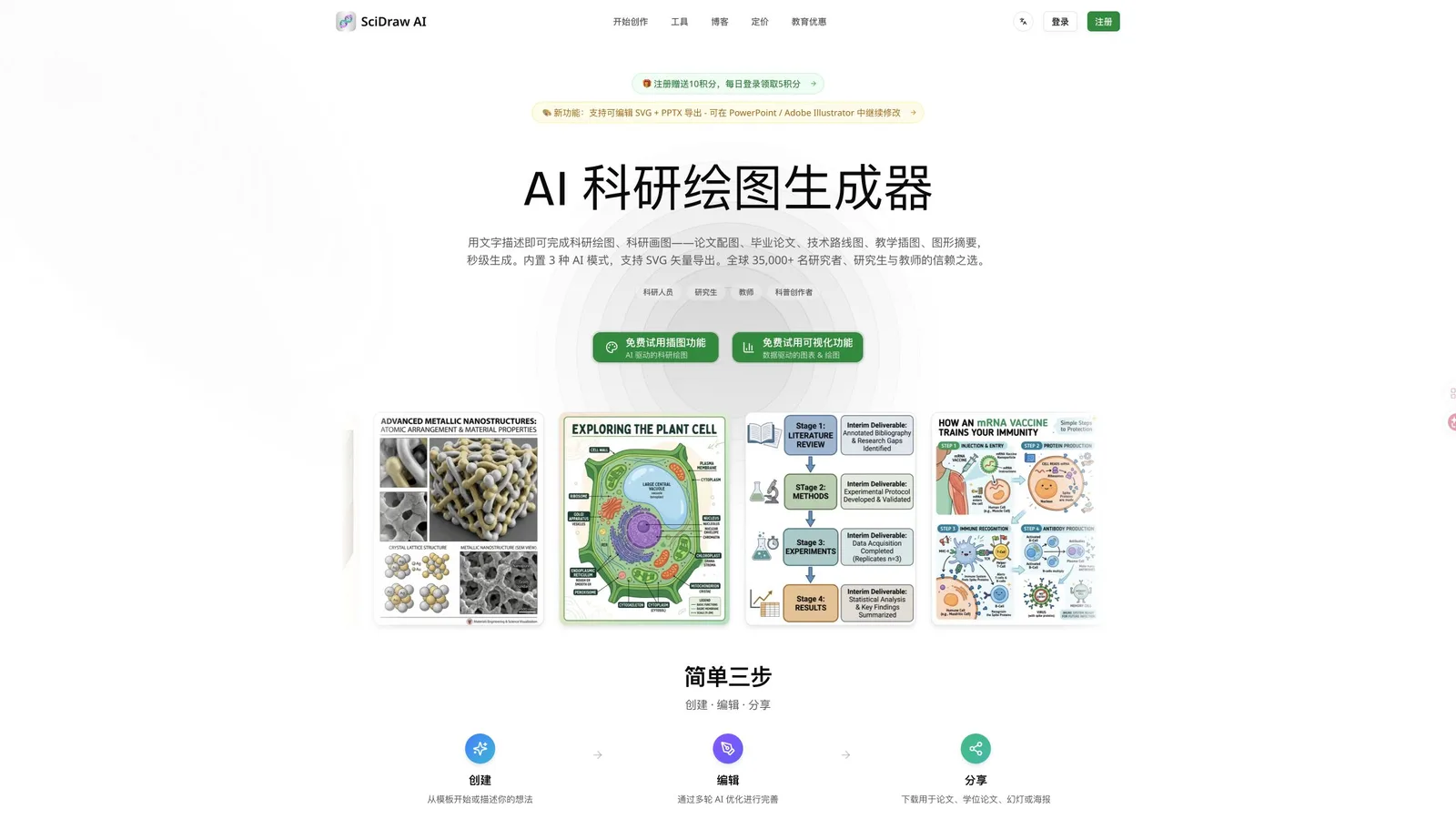
SciDraw presents scientific illustration and data visualization as two direct entry points, supported by research-specific examples.
SciDraw AI at sci-draw.com is a research-focused AI figure generator for papers, theses, posters, teaching, and science communication. Its homepage and public creation demo organize the workflow around recognizable academic deliverables instead of a generic image prompt.
The current product exposes several practical advantages:
- Text-to-image, sketch-to-image, and image-editing modes
- 2K or 4K resolution and batches of one to four images
- A text language control for labels inside the image
- Templates, visual styles, and aspect-ratio controls
- A visible multi-turn editing workflow after generation
- Paid SVG vector conversion and editable PPTX export
- Dedicated entry points for graphical abstracts, scientific figures, posters, teaching diagrams, and data charts
SciDraw is especially appealing when the task is easy to describe and the output can be refined through a few prompt-based passes. Its editable PPTX option is also a genuine advantage for labs that finish figures in PowerPoint.
How to Use SciDraw AI
SciDraw's public demo makes the basic workflow easy to understand before registration.
Step 1: Set up the figure
Open the AI Drawing workspace and choose a mode — text-to-image for a new concept, sketch-to-image for a rough composition, or edit image for another pass on an existing visual. Write the subject, relationships, labels, audience, and intended deliverable in the prompt area (up to 2,000 characters). A useful request states what must be scientifically preserved, not only the desired visual style. Then pick a research template, visual style, and aspect ratio from the advanced options.
Step 2: Choose output and generate
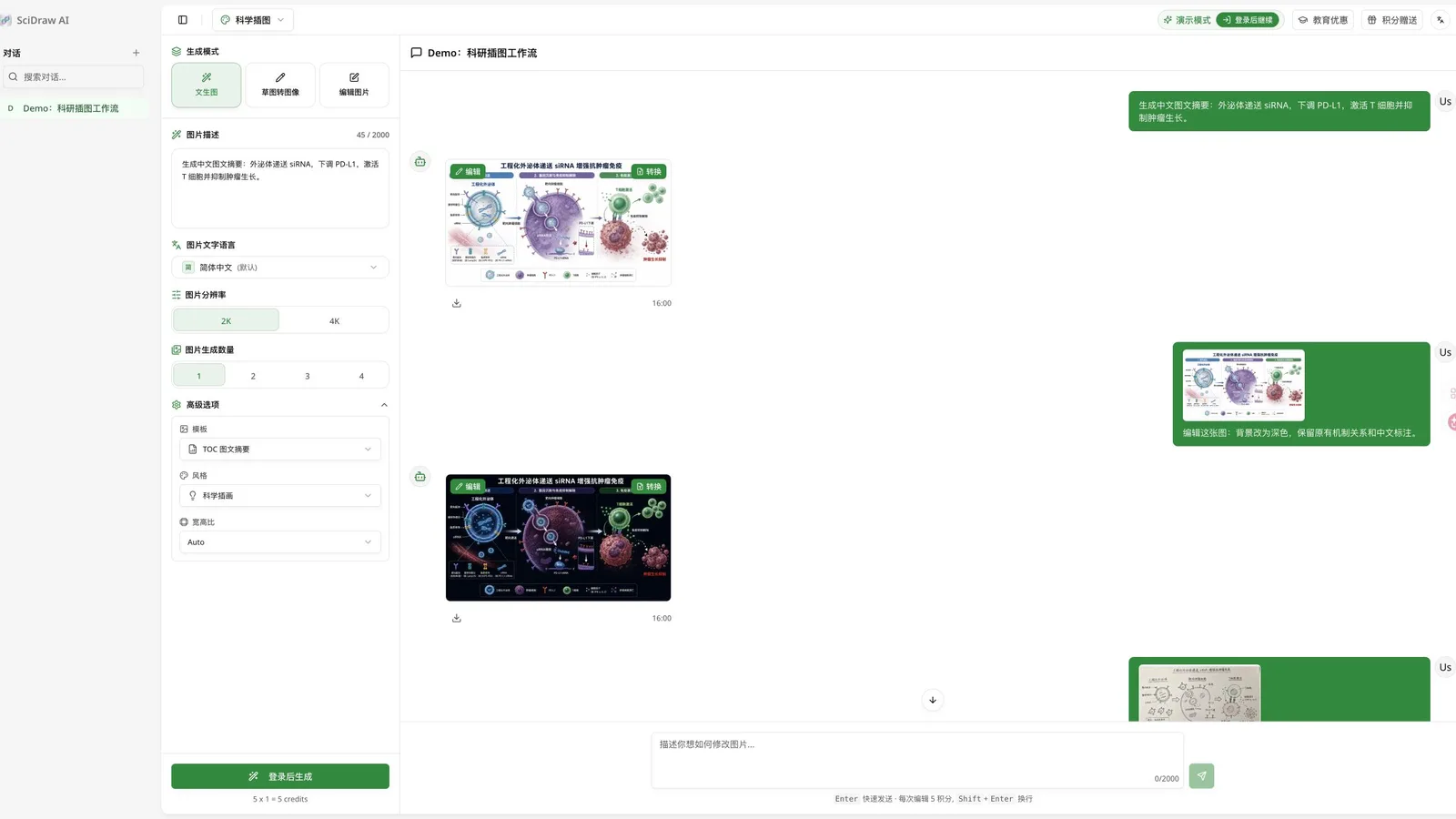
The SciDraw public demo shows a first draft, a dark-background revision, and a sketch-based revision in one conversation.
Select the language that should appear inside the figure, choose 2K or 4K, and request one to four results. More outputs multiply the credit cost, so one carefully specified draft is the safer starting point. The demo prices one generated image at 5 credits, with each conversational edit also costing 5 credits.
Step 3: Revise, convert, and download
After generation, verify every label and relationship against the source. Use the conversational Edit for refinements, Convert for paid SVG vector conversion, or Download for the result. Paid plans add publication rights and editable PPTX export.
Testing boundary: We inspected the public generator, its demo conversation, generation controls, pricing, copyright terms, and public examples. Creating a fresh result required login, so we did not score an ungenerated output or claim that we tested a paid SVG/PPTX export.
Where SciDraw Starts to Feel Limited
SciDraw can produce an effective first draft, but three limits matter when that draft enters a real publication workflow.
Scientific accuracy still belongs to the researcher
A six-reply ResearchGate discussion among researchers praises SciDraw's presentation quality but also documents the main risk: one generated illustration looked professional yet misinterpreted the meaning of "tinting." The takeaway is the same one participants recommend — treat AI output as a concept draft, then verify every label, arrow, molecular relationship, scale, and causal claim against the source data.
Editable export still needs a structure check
SVG and PPTX are valuable formats, but the file extension alone does not prove that the figure is easy to revise. Before adopting any workflow, export one representative figure and confirm that text remains text, arrows remain understandable connectors, and important objects can be selected without rebuilding the composition.
Free use excludes the most important publication rights
On the SciDraw pricing page, the free plan includes 10 registration credits, 5 daily login credits, templates, styles, and 30-day history. It explicitly excludes SVG vector conversion and journal or commercial use. Those capabilities begin on paid plans.
Why Researchers Need More Than a First Draft
The strongest case for an alternative comes from what researchers do after generation.
We analyzed anonymized product usage from an earlier scientific-illustration project. A read-only snapshot captured during this review on August 1, 2026 covers 16,511 successful generation operations, 118 editable projects, 422 recorded project versions, and 47 voluntary survey responses. The database can grow after retrieval, and the survey is small and self-selected, so these figures describe that fixed snapshot and are directional rather than representative of every researcher.
- Text-to-image accounted for 73.0% of successful generation operations.
- Image or reference-based editing accounted for 19.3%.
- Text-to-editable-SVG accounted for 6.6%.
- The remaining 1.1% consisted of 102 template-composition operations and 82 SVG workspace AI edits.
- 53.4% of editable projects started by importing an existing SVG.
- 47.8% of projects with versions reached at least two versions, and 23.9% reached at least five.
- After the initial composition, 86.7% of recorded revisions were manual refinements rather than AI edits.
This pattern explains the gap between a good generator and a durable research workflow. The first draft saves time. The product earns its place when a coauthor asks to rename one label, reverse one arrow, move one panel, preserve everything else, and return to an earlier version if the change fails.
Meet FigEditor: A SciDraw Alternative Built for Revision
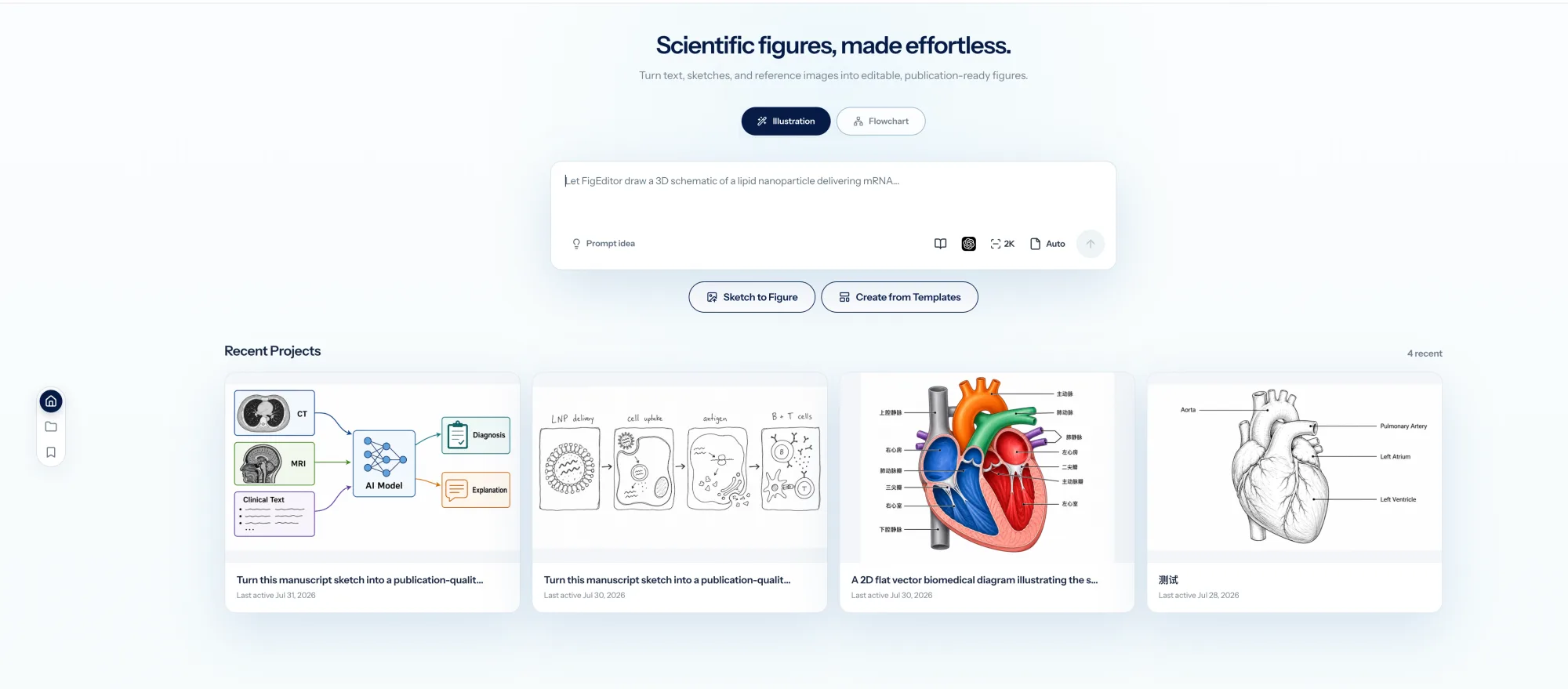
FigEditor keeps generation, editable diagrams, projects, and recent research figures inside one workspace.
FigEditor is built for the part of figure-making that comes after the first draft — the revisions a coauthor or reviewer actually asks for. It keeps visual illustration, structured SVG editing, existing-image import, and paper-based poster drafts in one workspace, so a figure does not have to jump between tools as it moves through review.
Start with the material behind the figure
Use methods text, a caption, a paper excerpt, a sketch, a reference image, or an existing SVG. A paper PDF can also start the scientific-poster workflow. This matters when the figure must remain grounded in a real study rather than a short visual prompt.
Choose image editing or structured SVG intentionally
Studio creates and refines visual raster illustrations through selected-area redraw, OCR text editing, recoloring, and aspect-ratio changes. AutoFigure and Flowchart are the structured paths for editable SVG, labels, shapes, nodes, connectors, and source code. FigEditor does not pretend every generated image is automatically structured SVG.
Keep revisions connected to a project
Projects retain prompts, source material, conversation context, generated assets, and, for flowcharts, version history with restoration. That structure helps when the same figure moves from author review to a revision letter, presentation, or poster.
Continue into a paper or poster workflow
The scientific poster maker starts from a paper PDF and produces a poster draft with extracted research structure. The current poster output is an image, not an editable PPTX, so SciDraw remains the better choice when editable PowerPoint delivery is mandatory.
How to Use FigEditor
The fairest test uses a figure that already has a real correction request.
Step 1: Pick the workflow and add the source material
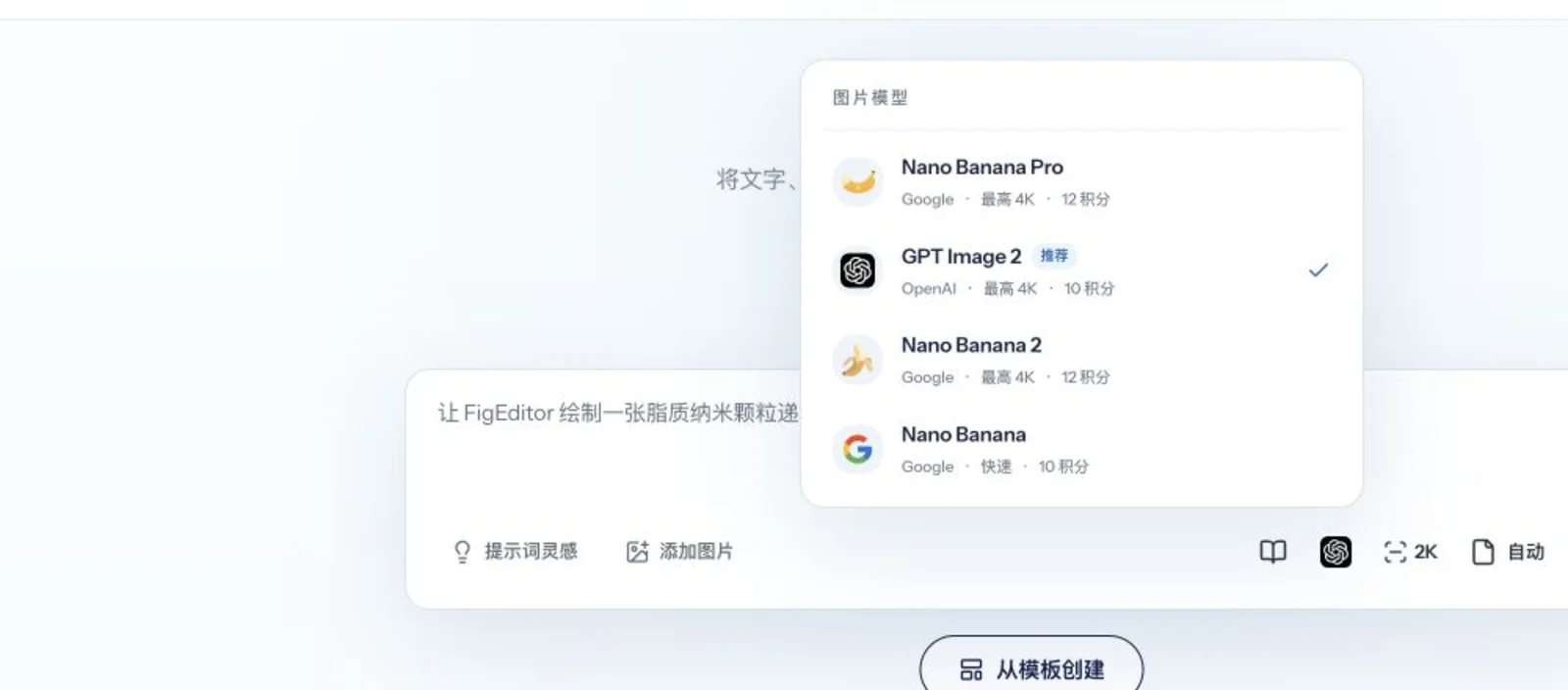
Use Studio for a visual illustration or selected-area image correction. Use AutoFigure or Flowchart when labels, nodes, connectors, or SVG structure must stay directly editable. Then paste the verified methods paragraph or caption, attach the sketch, reference image, existing figure, or SVG, and state the relationships that must not change — not only the desired style.
Step 2: Generate, then make the smallest possible correction
Choose the model, aspect ratio, and resolution that match the deliverable, and check scientific relationships before spending credits on polish. For the revision itself, use selected-area redraw or OCR text editing on a raster image, or edit the actual label, node, connector, shape, position, color, or SVG source on a structured diagram.
Step 3: Save a version and inspect the export
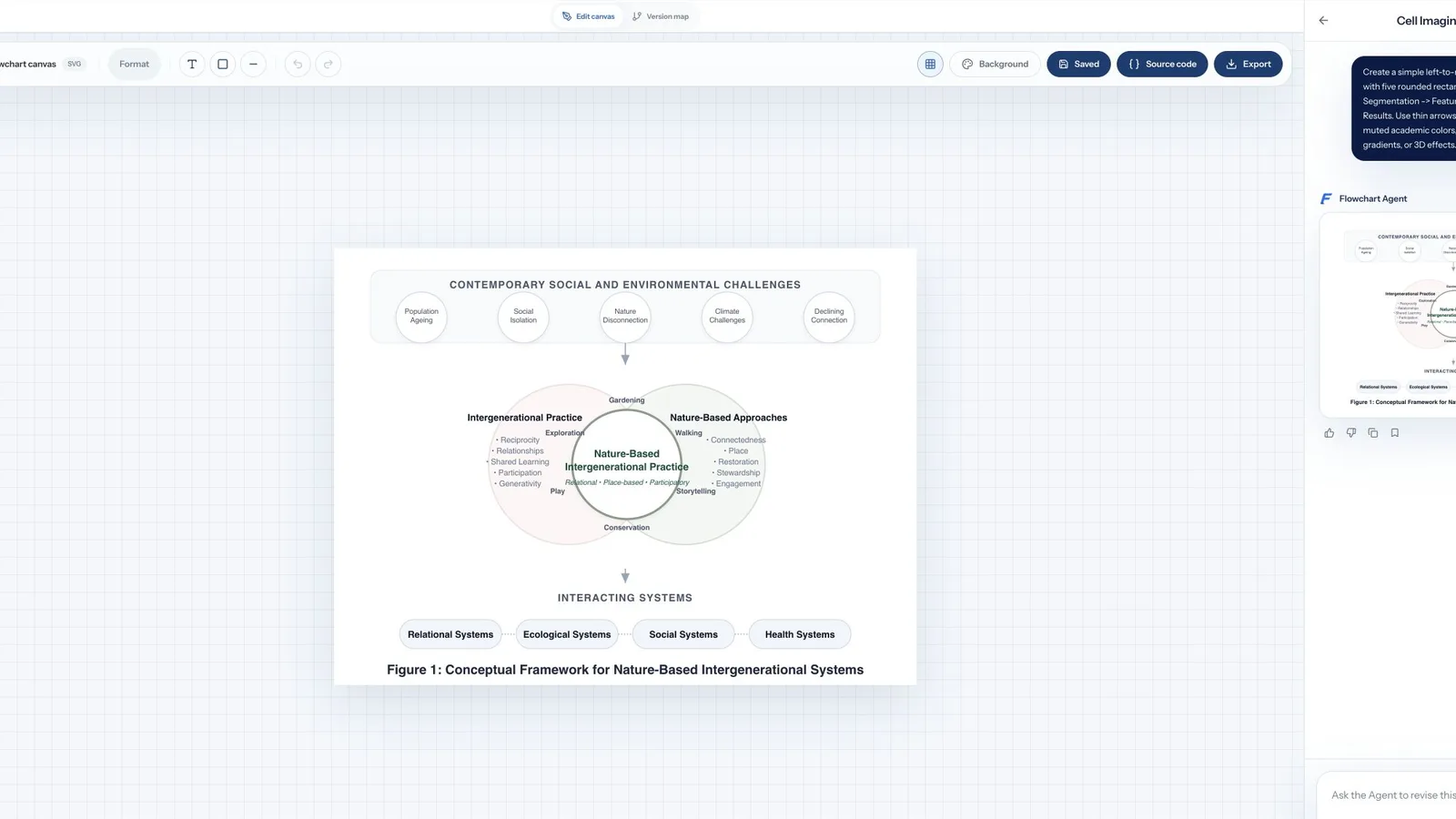
The Flowchart path exposes the structure a reviewer is likely to comment on, including labels, objects, nodes, and connectors.
Save the accepted state before the next revision. Export SVG, PNG, or JPG from the structured workflow, then open the file in the downstream tool your lab already uses.
Bring one real reviewer correction to FigEditor and test whether you can change that element without rebuilding the rest of the figure.
SciDraw vs FigEditor: Workflow and Pricing
| Decision area | SciDraw AI | FigEditor |
|---|---|---|
| Best for | Fast prompt-led research illustrations and editable PPTX | Research figures that need precise revisions and versioned SVG structure |
| Starting input | Prompt, sketch, image, CSV/Excel in supported tools | Prompt, methods text, paper excerpt, sketch, image, SVG, or PDF in supported workflows |
| Generation modes | Text-to-image, sketch-to-image, image editing | Raster Studio, AutoFigure, structured Flowchart, Paper Banana, paper-to-poster |
| Image resolution | 2K or 4K | Up to 4K depending on model and workflow |
| Local image edits | Conversational image editing | Selected-area redraw, OCR text edit, recolor, and aspect changes |
| Structured SVG | Paid SVG conversion; inspect one export before committing | AutoFigure and Flowchart expose SVG objects, text, nodes, connectors, and source |
| Editable PPTX | Yes on paid workflows | No native editable PPTX export |
| Version workflow | Paid plans advertise permanent history | Flowchart versions, comparison, restoration, and project history |
| Poster workflow | Scientific poster tools and PPTX-oriented delivery | Paper PDF to poster-image workflow |
| Free use | 10 sign-up credits plus 5 daily; no SVG or publication/commercial rights | 50 sign-up credits; free users wait before generation |
| Paid entry | Standard $20/month or $10/month equivalent on annual selector | Basic $19/month or $114/year |
SciDraw is cheaper on the annual Standard display and offers editable PPTX, so it wins when those are the deciding factors. Its public demo shows 5 credits for one generation and 5 credits for each edit; the Standard plan includes 300 credits per month.
FigEditor's monthly Basic plan is $19 for 500 credits. Studio image operations typically use 10 to 15 credits depending on model and resolution, while Flowchart generation or an agent revision uses 10 credits. Raw credit counts are not directly comparable because the products price different operations.
The better cost question is: how many attempts, edits, conversions, and tool switches does one accepted figure require? SciDraw can be the economical option for straightforward prompt-to-PPTX work. FigEditor becomes valuable when repeated structural revisions would otherwise move between an AI generator, SVG editor, version folder, and poster tool.
Which Scientific Figure Tool Should You Choose?
Choose SciDraw AI if…
- You want the lower annual entry price shown on its current pricing page.
- Text, sketch, or image-to-figure generation covers most of your work.
- Editable PPTX is a required final format.
- You prefer a compact prompt-and-template interface.
- Most figures need only a few conversational edits.
Choose FigEditor if…
- You need to correct selected regions, labels, nodes, connectors, or SVG source.
- You often bring existing images or SVGs into the workflow.
- Coauthor and reviewer feedback creates multiple figure versions.
- You want figure, diagram, project, and paper-to-poster work in one product.
- You value automatic credit refunds when generation fails.
Neither product removes the need for scientific review. If the figure encodes quantitative data, generate the chart from verified data and code first, then use AI only for layout or explanatory illustration where your journal permits it.
How to Move from SciDraw to FigEditor
- Export the best available SciDraw SVG when you have paid vector access. Otherwise save the highest-resolution raster output and the original prompt.
- Open one representative file and identify which labels, arrows, and objects are actually editable.
- Import a usable SVG into the structured workflow, or use the raster image as a reference in Studio.
- Rebuild only the relationships that require direct control. Do not redraw accepted content without a reason.
- Store the revision as a new project version, then verify every scientific claim against the source.
- Export a representative deliverable and test it in the lab's actual downstream software before migrating more figures.
SciDraw Alternative FAQ
What is the best SciDraw alternative for editable scientific figures?
FigEditor is a strong SciDraw alternative when a figure needs selected-area correction, structured SVG editing, version history, and repeated coauthor or reviewer revisions. SciDraw may remain the better choice when editable PPTX and a lower annual entry price matter more.
Is SciDraw AI the same as scidraw.org or scidraw.io?
No. sci-draw.com is the AI scientific figure generator discussed here. scidraw.org is a separate AI figure generator, while scidraw.io is an open repository of reusable scientific illustrations under Creative Commons licenses.
How much does SciDraw cost?
On August 1, 2026, SciDraw displayed a free plan, Standard at $20 monthly, Premium at $40 monthly, and Enterprise at $80 monthly. Its annual selector showed monthly equivalents of $10, $20, and $40. Check the live pricing page before purchasing because prices and credit rules can change.
Does SciDraw have free credits?
Yes. The current pricing page lists 10 credits at registration and 5 credits for daily login. The free plan excludes SVG vector conversion and journal or commercial use.
Can SciDraw export editable SVG and PPTX?
SciDraw advertises SVG conversion and editable PPTX on paid workflows. Test a representative export before adopting it for a full paper: confirm that labels and important objects remain easy to select and revise.
Is FigEditor better than SciDraw?
FigEditor is better for structured SVG, local corrections, project continuity, and versioned revision. SciDraw is better for editable PPTX and can be cheaper on its annual Standard plan. The better product depends on the deliverable your lab must revise and submit.
Can FigEditor edit an existing SciDraw figure?
Yes. Import a usable SVG into the structured workflow or add a raster export as a reference in Studio. The amount of preserved editability depends on the structure of the original SciDraw export.
Are AI-generated scientific figures accurate enough to publish directly?
No AI-generated figure should be published without human verification. Check labels, causal relationships, molecules, units, statistics, and journal disclosure rules. The author remains responsible for the figure's scientific accuracy.
When should I not choose FigEditor?
Do not choose FigEditor solely for native editable PPTX, because it does not currently offer that export. It is also more workspace-oriented than SciDraw, so a user who needs one quick prompt-led image may prefer SciDraw's simpler path.
Final Verdict
SciDraw AI is a capable research-focused generator with a clear public demo, useful templates, and an editable PPTX advantage. Its limitations appear when scientific accuracy, structural SVG editing, independent proof, and repeated revision matter more than the first render.
If your real bottleneck is changing one label or arrow without disturbing an accepted composition, bring that correction to FigEditor. For adjacent comparisons, see our ConceptViz alternative and FigureLabs alternative guides.